
The most persuasive misinformation is rarely a dramatic deepfake. More often, it is a screenshot, grainy enough to feel authentic, specific enough to feel personal. A supposed direct message between a politician and an aide. A leaked Slack exchange from a company in crisis. A “sent from iPhone” text that lands in a reporter’s inbox with the implied promise of a clean scoop.
Newsrooms have always had to ask: Is this real, and how do we know? What has changed is the speed and polish with which fabricated “proof” can be assembled. The tools are easy to find, the templates look familiar, and the result fits neatly into the way people already communicate. That is why an increasing number of journalists now treat image verification as a routine step, not a special investigation reserved for war zones or celebrity scandals.
AI image detectors are becoming part of that routine, sitting alongside calls to sources, checks against public records, and the unglamorous work of asking someone to forward the full email thread instead of a cropped screenshot.
The screenshot era never ended, it got automated
A decade ago, a fake chat screenshot often betrayed itself through clumsy typography or misaligned timestamps. Today, anyone can produce a convincing facsimile of a messaging app in minutes, complete with realistic battery icons, read receipts, and the casual punctuation that gives a conversation texture. Many of these generators advertise themselves as harmless and, in many uses, they are. They make memes, classroom examples, UX wireframes, props for film and television, and quick storyboard beats for social media skits.
But the same convenience means a newsroom can receive a “leak” that never happened.
A reporter might be sent a whatsapp chat screenshot that appears to show a public figure making an inflammatory remark, or a manager pressuring staff to cover up a safety issue. The image arrives via email or Signal, accompanied by a short message: “This is going around internally.” It looks plausible. It reads like something someone might say. And it is detached from the trail that would normally help an editor assess credibility, like a full message export, device metadata, or corroboration from multiple participants.
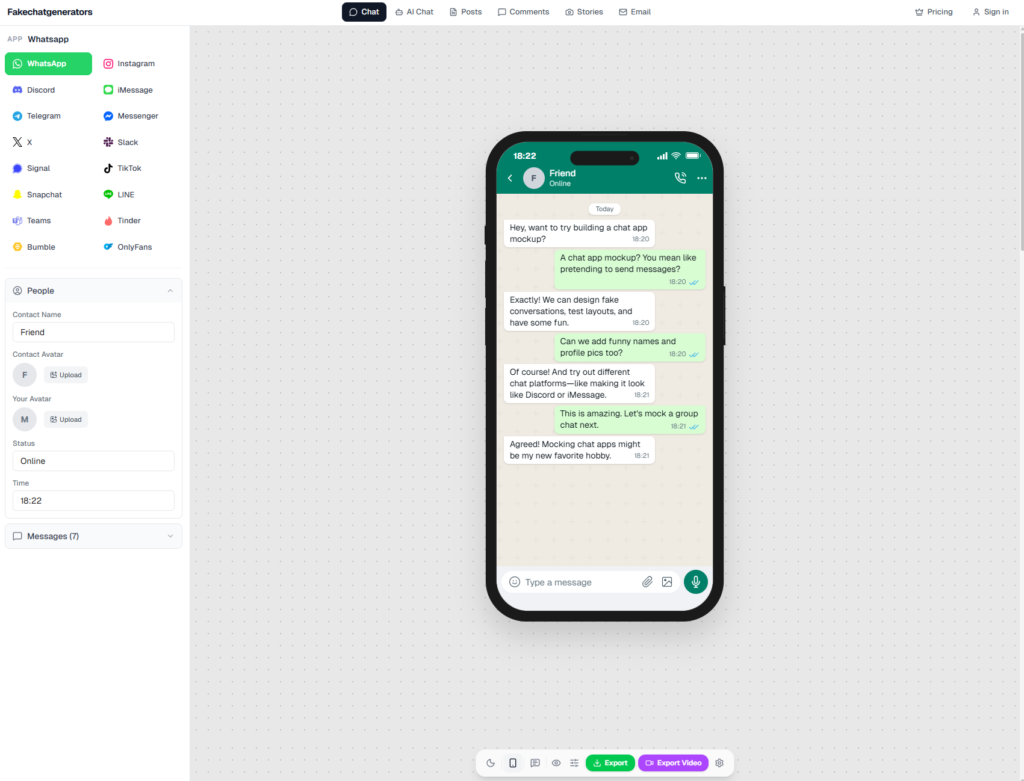
fakechatgenerators.com lets you mock up chat screenshots across 16 platforms
Screenshots were always easy to manipulate. The difference now is that fabrication has been packaged into a user-friendly interface and normalized through everyday, non-deceptive uses. That normalization matters. A fake can hide in plain sight because people are accustomed to seeing “mockups” in their feeds, and because the visual language of chats is so uniform that most audiences no longer examine it closely.
Where the workflow breaks, and how editors patch it
The first stress test tends to be editorial, not technical. Does the alleged conversation make sense with what is already known? Are the claims consistent with the subject’s public statements, or do they conveniently arrive at the perfect moment, framed to inflame? Is the source identifiable, reachable, and willing to put their name behind the material?
Those questions remain essential. But they are no longer sufficient. A fabricated screenshot can be internally coherent and still be false. It can be “on brand,” timed to a news cycle, and tailored to the publication’s audience.
In many newsrooms, the practical response has been to formalize what used to be ad hoc. A typical workflow now looks something like this:
- Triage the incoming material. Is this an image, a video, a PDF? Is it a screen capture, a photograph of a screen, or an export?
- Preserve the original file. Editors increasingly insist on receiving the highest-quality version available, rather than an image pasted into a messaging app that strips metadata and compresses detail.
- Run basic checks. Reverse image search (where applicable), file properties, signs of cropping, inconsistent fonts, abnormal shadows, duplicated patterns, and compression artifacts that suggest multiple saves.
- Escalate to specialized review. Visual investigations teams, standards editors, or security desks might get involved, particularly if the material could trigger legal exposure or physical risk.
- Document the decision. Even when a piece is held back, newsrooms keep notes on what was verified, what could not be confirmed, and why.
AI image detectors now sit inside that middle layer, between obvious red flags and a full forensic investigation. The goal is not to outsource judgment. It is to add one more instrument to the dashboard, especially when deadlines are tight and the cost of publishing a fake is high.
Why detectors are attractive in deadline reporting
Editors will be quick to note that verification cannot be reduced to a single score. A detector does not know whether a quote is true, whether a chat occurred, or whether a screenshot reflects a real exchange that has been selectively cropped to mislead. What it can do, in the best cases, is flag technical characteristics consistent with synthetic generation or manipulation.
That matters because the newsroom is often deciding under time pressure, with incomplete information.
An AI detector can be used as a gatekeeper: if an image is flagged as likely synthetic, it moves into a higher scrutiny queue. If it is not flagged, that does not clear it for publication, but it may allow editors to focus their limited time on other verification steps. In other words, it supports triage, the same way a spellchecker supports copyediting. It helps, but it is not the editor.
Some platforms pitch these tools in operational terms rather than as magic solutions. One example is an ai image detector that advertises detection of AI-generated media, NSFW content, violence, and document tampering, along with 98.7 percent detection accuracy across more than 50 generative models, sub-150ms latency, and coverage that includes Midjourney, DALL-E, Stable Diffusion, Flux, Ideogram, Google Gemini, and GANs. Those numbers are attractive to newsrooms because they map neatly onto workflow pressures. Editors do not just need accuracy, they need speed, and they need tools that can be called repeatedly without slowing the publishing pipeline.
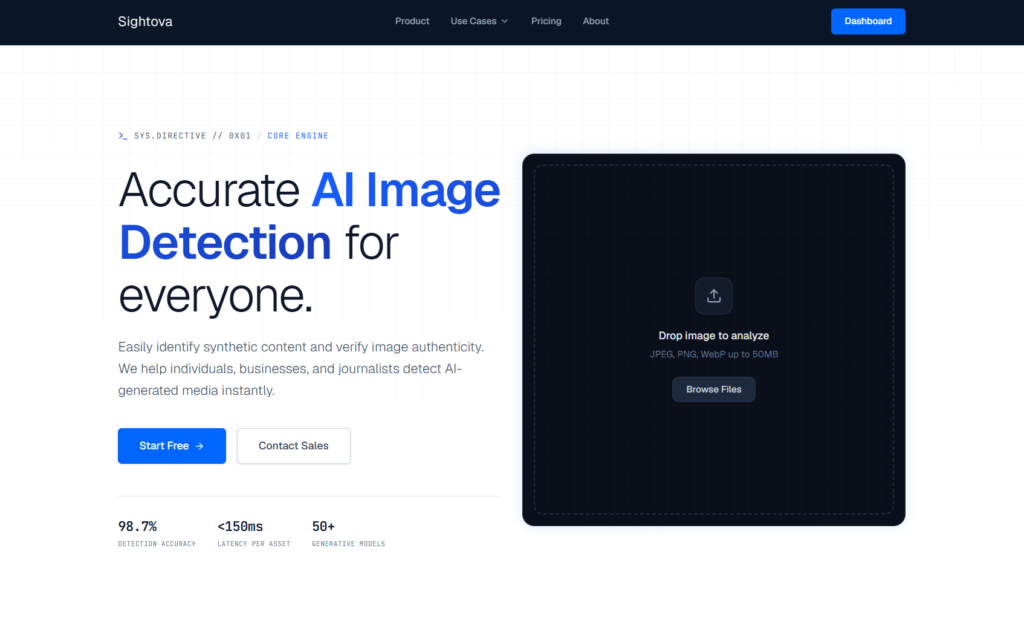
sightova.com flags AI-generated, tampered, NSFW, and violent imagery in milliseconds
In practice, a detector’s value is often less about the exact percentage and more about consistency. A tool that reliably flags the same kinds of suspicious artifacts helps teams build habits and shared expectations, especially when many staffers are rotating through a breaking-news desk.
The most common use case: “screenshots as sources”
Journalists have a complicated relationship with screenshots. They are frequently the only record a source can provide, especially in hostile workplaces where exporting messages could create a trail. They can also be a lifeline for reporting on harassment, extremism, or abuse, where the content is deleted quickly and the harm is real.
Yet screenshots are also a perfect delivery vehicle for fabrications because they compress a claim into a single image and invite immediate emotional reaction. They are also hard to authenticate definitively without cooperation from at least one participant in the conversation.
This is where detectors enter the workflow as a kind of early warning system. If an image is flagged as AI-generated or manipulated, editors may respond by tightening their requirements. They may ask for:
- The original file sent directly from the device (not re-saved or forwarded through multiple apps)
- A screen recording that shows the conversation being scrolled, including contact details and timestamps
- Additional corroboration, such as emails, calendar invites, call logs, or other participants who can confirm the exchange
- An on-the-record statement or, at minimum, a source willing to speak under agreed conditions
If the source cannot meet those requirements, the newsroom may still report on the existence of the claim, but only with careful language and clear attribution. Or it may choose not to report it at all.
Detectors are also about protecting the newsroom, not just the audience
One reason these tools are being adopted quietly is that the risk is not only reputational. It is legal. Publishing a false image can create exposure in defamation disputes, particularly when the image purports to be direct evidence of wrongdoing.
There is also the safety angle. Newsrooms that cover conflict, protests, or organized harassment campaigns are aware that manipulated media can be used to dox individuals, incite threats, or draw reporters into traps. A fabricated “internal memo” or altered document can send a newsroom chasing a story that never existed, while real stories go uncovered.
Editors are increasingly candid about another pressure: audience trust. A correction does not travel as far as the initial post, and in a fragmented media environment, a single high-profile mistake becomes ammunition for people who want to discredit all reporting. The safest course is to catch the problem before it hits the homepage, before a push alert, before the image is syndicated to partners who may not know its provenance.
How detectors fit with older verification methods
AI detection works best when it complements, rather than replaces, traditional reporting. In a disciplined newsroom, a detector’s output becomes one signal among many, weighed against:
- Source credibility and motive. Why is this being shared now, and why with this reporter?
- Chain of custody. Has the file passed through multiple hands? Was it downloaded, screen-captured, cropped, re-uploaded?
- Context. Does the alleged exchange align with known timelines, public schedules, and other reporting?
- Independent confirmation. Can a second source confirm key facts without being shown the image first?
- Transparency with readers. If a newsroom chooses to publish, it may explain what it could and could not verify, particularly when the content is central to the story.
This is also where newsroom culture matters. Reporters who treat verification as a shared responsibility, rather than a hurdle to clear, are more likely to surface doubts early. The opposite dynamic is familiar: a reporter feels pressure to deliver, the desk feels pressure to publish, and skepticism is framed as delay. A detector can help shift that dynamic by giving editors a neutral reason to pause: the tool flagged it, so the workflow requires additional checks.
The uncomfortable truth: detection is an arms race
No detector is perfect. Generative models change quickly. So do the tactics of people who want to evade scrutiny, whether they are pranksters, political operatives, or scammers. Even when a detector is accurate, newsroom staff still have to interpret results, understand limitations, and avoid overconfidence.
That is why the best newsroom use of AI detection is procedural. The output should be logged. The steps should be repeatable. The decision should be reviewable after publication, especially if new information emerges.
Some editors are also building “pre-bunking” into their reporting, warning readers that fabricated screenshots and synthetic images are common and explaining the mechanics of how they spread. This kind of transparency can feel awkward in a traditional news style, but it meets audiences where they are. People are seeing doctored media every day. They are also, understandably, exhausted by the question of what is real.
Before publish, one last question
A seasoned editor’s final check is often simple: If this turns out to be fake, did we do enough to avoid being fooled? The answer is rarely found in a single tool. It comes from a chain of decisions, each one recorded and defensible.
AI image detectors have entered the newsroom because the raw material of reporting has changed. Images are no longer just photographs. They are evidence, propaganda, performance, and sometimes a trap. When a newsroom runs a detector before hitting publish, it is not chasing novelty. It is doing what it has always done, adapting its verification rituals to the latest form of the old problem: someone, somewhere, trying to pass off a convincing lie as a document.